

For many professionals in the digital domain, making use of productivity tools has become the norm. If you’re not already using them, then you could be wasting precious time and resources that could be best optimized elsewhere.
Making your work life a little easier sounds like the dream, right? Well, productivity tools do just about anything nowadays, especially with the use of automation and AI being so prominent.

One study found that 78% of the business leaders asked reported that their organizations have already adopted AI in at least one business function for the benefit of a competitive edge.
In this guide, we’ll take a look at what productivity tools are worthwhile having in your tech stack for efficiency, cost savings, and most importantly, relief on employee workloads.
1. Smallpdf
Starting with a reliable productivity tool, Smallpdf is a helpful tool used by many business professionals who need speed and simplicity when working with documents.
Smallpdf helps in compressing documents of this format, converting them to different doc types, and more. One of its useful features is the Split PDF tool, whereby you quickly split PDFs by pages or ranges. It works incredibly well due to its clear interface and, as such, doesn’t slow down workflows.
Being browser-based, like many of these online productivity tools, no complex installation is required, and onboarding your staff is a breeze. If you’re looking for the best tools to split PDFs online, then this tool is a great one to add to your stack.
2. Notion
Having to juggle meetings with any research or development projects you’re working on is quite challenging at the best of times. Having a place where your thinking doesn’t get lost is important, which is why Notion is often a useful pick.
As a flexible workspace for notes, lightweight documentation, and project tracking, Notion provides a central hub that is a lifesaver for those who struggle to balance the workload.
Teams and individuals will often rely on it ot replace a mix of docs and task lists, making the working day a lot less complicated than it needs to be.
Some of Notion’s key strengths include the ability to combine notes, datatabases and tasks in one place. It has strong collaboration and sharing controls, making it easier to connect with your peers, as well as anyone employed or contracted outside of the company.
With Notion, you have scalability from solo use to team knowledge bases, and it’s very easy to adapt to different workflows without any technical setup.
This tool is likely most suited for those who are knowledge workers and require an adaptable system for both collaboration and thinking. However, it’s important to have structure and ownership over the platform in order to avoid it becoming messy.
3. Microsoft Power Automate
Microsoft Power Automate is often a useful choice for those who are losing time to small and repetitive actions. The benefit of automation, as many already know, is that it removes the repetitive and often monotonous hassle that comes with some tasks and responsibilities.
Many professionals choose this tool as it’s a good way to help reduce friction when automating routine workflows across Microsoft 365 and other connected apps. Whether it’s saving files, updating spreadsheets, or moving data between tools, this platform is highly intuitive.
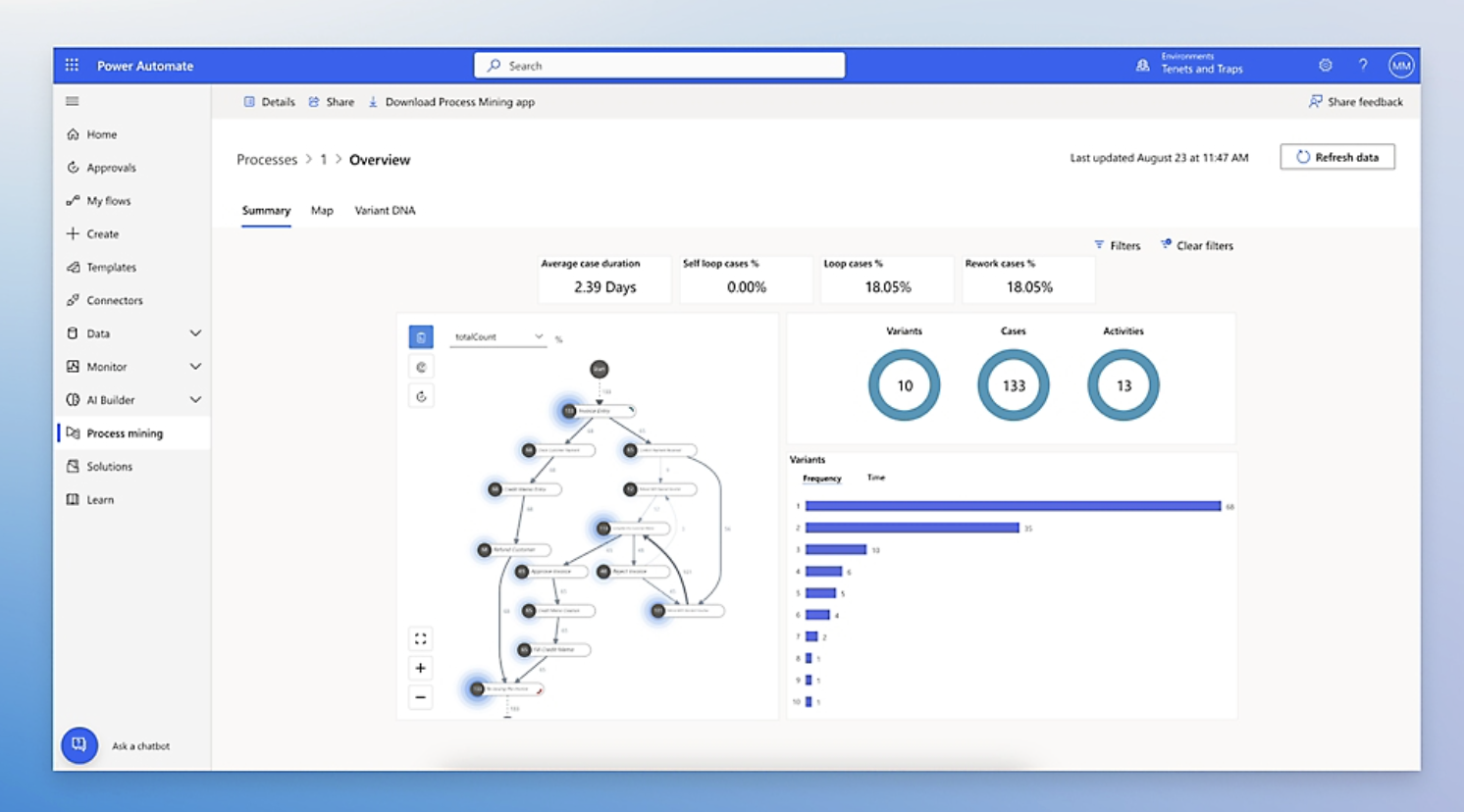
The main strength that comes with this tool is that it deeply integrates with Outlook, Excel, and Teams. Of course, these are all incredibly popular with businesses across the globe, and such integration saves a lot of time and effort.
It’s helpful for the purpose of remaining compliant and adhering to audits as and when they’re conducted. For those businesses that may be looking to scale across departments, it provides a great deal of efficiency, and its no-code automation makes it easy for any employee to understand.
Are there limitations with this one? Well, considering it’s so well integrated across Microsoft’s ecosystem, the same can’t be said when it comes to workflows that extend beyond it. You may find it hard to integrate other platforms or tools that aren’t connected to Microsoft.
If you’re a professional who works heavily inside Microsoft tools, then this is a great way to reduce a lot of your manual process work.
4. Asana
As projects grow within the business, a lot of the traditional forms of communication, like email and chat, might end up being unreliable. If you imagine how many emails you’re having to comb through each day, communication between peers and those beyond the business might prove challenging.
That’s why project management tools like Asana are useful to adopt to give teams visibility of who’s doing what and when. It removes a lot of the radio silence that often occurs when team members get busy and bogged down with work.
There are also plenty of variations of Asana that you might want to explore, depending on the budget and team size/project scope required.
Some of the key strengths of using a platform like this one are the clear task ownership and deadlines that are assigned to users. There are multiple views available for different working styles, like lists, boards, and timelines.
It’s a useful platform for cross-functional collaboration and for connecting those working on the project from outside the internal team. Many users of the tool will simply log in first thing and then work from the platform throughout the day as needed.
If you’re a professional managing ongoing projects and require accountability across shared timelines, then this is perfect. Its only limitation is that it may feel too big a platform for small teams or simple projects.
5. Clockwise
A platform that helps you optimize your day sounds like a real crowd-pleaser for professionals, and so using Clockwise certainly helps you to maximize the working day available.
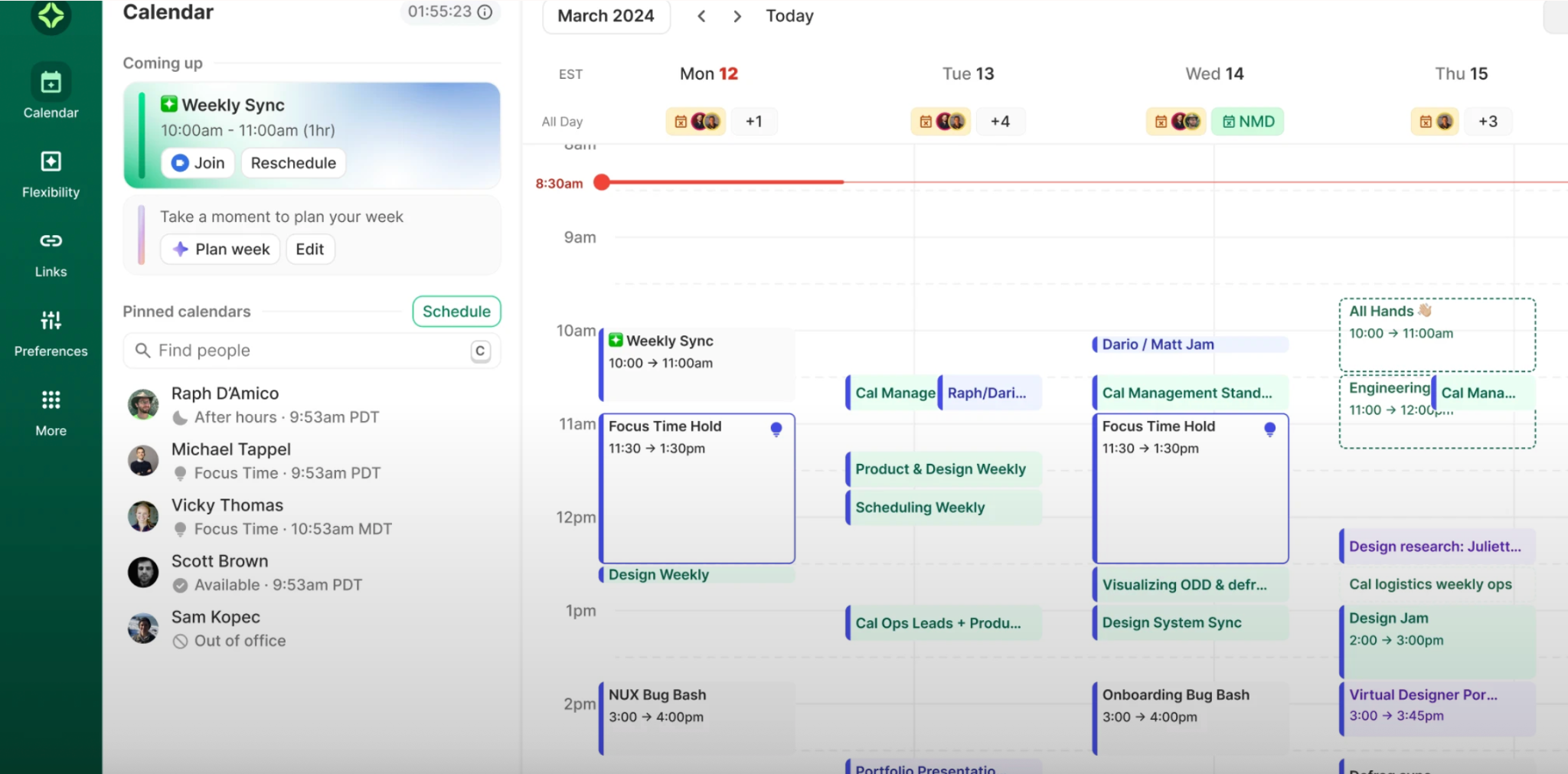
It works by connecting any calendars, selecting meeting preferences, and deciding which meetings out of your working week or month are flexible.
From there, Clockwise optimizes your day to schedule meetings that fit your working day or week, whilst providing plenty of time around them for focus time. Ultimately, it helps make your work calendar less complicated and hopefully gives you more breathing space throughout the day.
6. Zapier
Professionals will often use multiple tools, and that often leads to friction where systems aren’t talking to each other.
That causes missed opportunities, as well as duplicated work between team members. Zapier works as a bridge to bring those tools together without the need for custom development.
There are plenty of key strengths that appeal to professionals who use Zapier. Connecting thousands of tools with minimal setup and saving time on repetitive cross-tool tasks is another benefit.
A productivity tool like Zapier is great for scaling automation gradually and is adaptable for both solo professionals and teams alike.
For those who have complex workflows, the cost of using Zapier might be more expensive than anticipated. However, professionals who rely on multiple platforms but want a smoother and automated workflow process will find this tool to be very useful.
How productivity tools benefit professionals in 2026?
Productivity tools used by professionals in 2026 offer plenty of useful benefits that are worth the investment of time and/or money to implement them. Such benefits include:
- Automation of mundane tasks
- Enhanced focus and reduced distractions
- Centralized and streamlined workflows
- Data-driven decision making
- Improved work-life balance
- Increased flexibility and mobility
- Upskilling and continuous learning for all employees
Choose your productivity tech stack wisely
While there’s so much in the way of advancement in productivity tools, there is quite a saturated market of options. Some will come with varying price points, and others might not have the same quality features as others.
Therefore, it’s helpful to do your research and dive into the details of each tool or platform before committing to any subscriptions.

Author Bio: Natalie Griffiths (LinkedIn)
Natalie is a freelance writer with five years of experience in copywriting for businesses, spanning many industries.
