

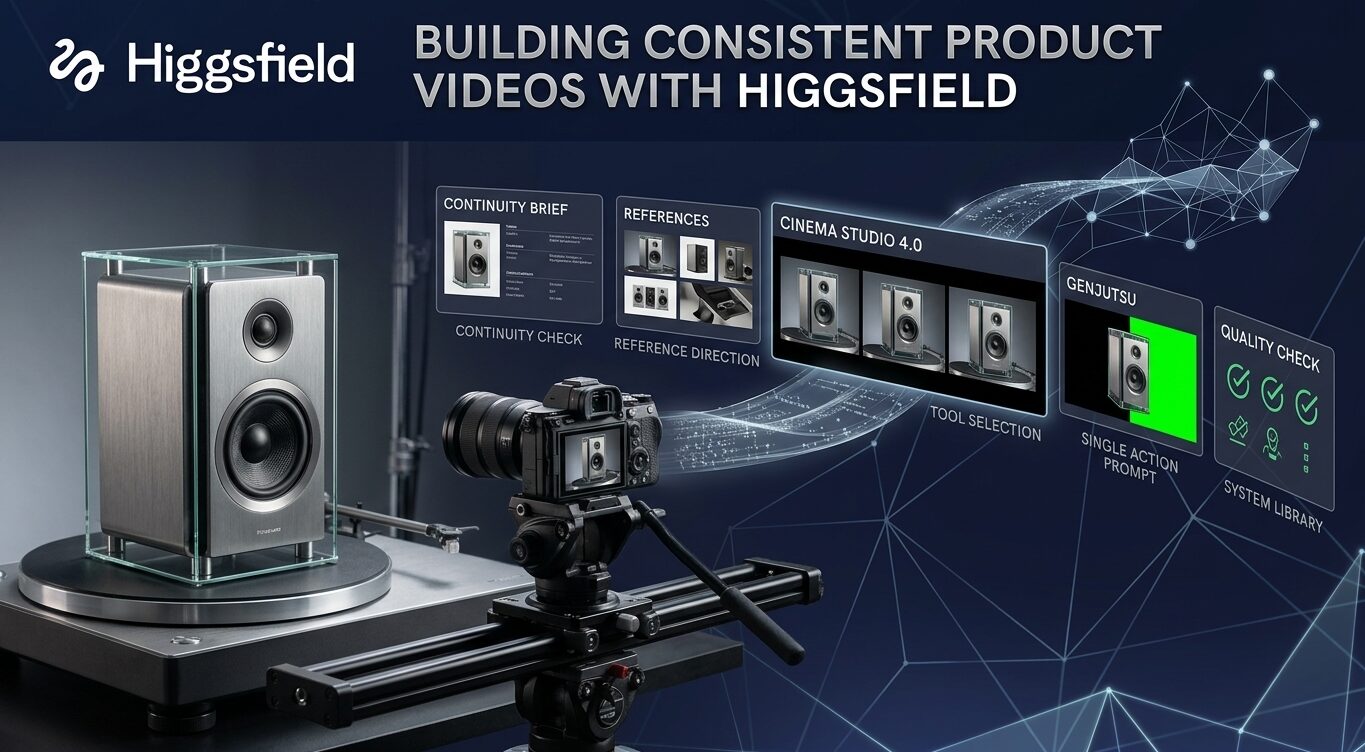
A product video can lose credibility in a single frame when the product changes shape, the lighting jumps, or the setting no longer matches the opening shot. Viewers may not describe the problem technically, but they notice that the story feels unstable.
Consistency is especially important in product marketing because the audience is trying to remember a specific object, interface, experience, or promise. If the visual identity keeps changing, the message becomes harder to trust.
That is where Higgsfield AI can become more useful than a one-off clip generator. In VideoGen, teams can create cinematic shots, transform existing footage, and develop still-image concepts, then place those assets inside a complete project with supporting scenes, voiceover, music, captions, and timing.
The goal is not to make every shot identical. It is to make every shot feel as if it belongs to the same product story.
Start with a continuity brief
Before writing a prompt, create a short continuity brief. Record the product’s important physical details, colors, materials, proportions, and distinctive features.
If the video includes a person, describe the wardrobe, age range, posture, and visual role without overloading the brief with details that do not matter to the audience.
If the scene has a location, note the layout, time of day, lighting direction, and background elements that should remain stable.
Add a section called “allowed to change.” This might include camera angle, background atmosphere, weather, or the movement of the subject. Another section should list “must remain fixed,” such as a logo, product silhouette, control layout, or brand color.
This simple distinction prevents the team from treating every variation as a creative improvement. It also gives reviewers a practical way to identify a continuity error.
Use references as direction, not decoration
Reference images and existing footage are most valuable when they answer a specific visual question. A product image can anchor the appearance of the object.
A location reference can establish the environment. A short video can show how an action should begin or end. A still frame can define the composition for a scene that will later become part of a larger edit.
Do not attach references without explaining their role. A prompt that says “use this image to preserve the product shape while changing the camera movement” is more useful than a prompt that simply includes several unrelated images.
Fewer, better references often make review easier because the team can tell what the model was expected to preserve.
Choose the Higgsfield tool by scene
VideoGen’s Higgsfield workflow supports different kinds of visual work, so the best result usually comes from making the tool choice scene by scene. Cinema Studio 4.0 can support cinematic shots when the story needs controlled movement, atmosphere, or a product reveal.
Genjutsu can transform existing footage when the core action already works, but the visual treatment needs to change.
Soul can create still images for product settings, concept frames, or moments where a composed image is more useful than motion.
A product launch might begin with a Cinema Studio shot that establishes the design language. The middle of the video could use real footage transformed with Genjutsu, allowing the audience to see a believable action in a new visual context.
A Soul still could provide a clean pause before the closing message. Choosing tools this way creates variety without making the campaign feel random.
Write prompts around one clear action
The most reliable product prompts describe one main action, not an entire commercial. Start with the subject and the feature the viewer should notice.
Then describe what changes: the product turns toward a light source, a hand places it on a surface, a camera moves around the edge, or an existing scene shifts into a new visual treatment.
Add camera direction in production language. A slow push-in creates a different emphasis from a lateral tracking move or an overhead reveal.
Specify the lighting and mood only after the action is clear. If the product must remain recognizable, say which details cannot change.
A focused prompt is easier to revise because the team can identify whether the problem came from the subject, movement, camera, or atmosphere.
Review the shot in the sequence
A generated clip can look excellent on its own and still fail in the edit. Place it between the scenes that come before and after it. Check the direction of movement, the distance from the product, the brightness, the color palette, and the viewer’s understanding of the action.
A beautiful close-up may be too abrupt after a wide establishing shot. A dramatic camera move may make the next voiceover difficult to follow.
Review sound and captions at the same time. A visual change may need a short narration bridge. A product detail may need a caption that tells the audience what to notice. If the edit is meant for silent viewing, make sure the story remains understandable without relying on music or voiceover to explain the image.
Create a quality-control checklist
A continuity checklist turns taste into a repeatable review. Confirm that the product appearance is stable, the logo and controls are accurate, the action is physically understandable, and the shot matches the intended aspect ratio and duration.
Check whether the scene introduces any object, person, or text that was not requested. Review transitions for sudden changes in lighting, scale, or camera direction.
Separate visual review from factual review. A scene can be visually polished and still make a false product claim. Give someone responsibility for checking what the video says, while another reviewer checks whether the visual presentation supports that claim.
This division makes approval more reliable without requiring every reviewer to judge every detail in the same way.
Turn successful results into a system
Save approved product references, successful prompts, camera directions, rejected examples, and review notes. Organize the library by product, campaign, scene type, and visual treatment. Include a short explanation of why a prompt worked and what the team changed during editing.
The library becomes a practical record of the brand’s visual language. It makes the next brief faster to prepare, helps new collaborators understand the standard, and reduces the temptation to start from a blank prompt every time.
The long-term advantage of Higgsfield AI is not one impressive generation. It is a repeatable process for producing coherent visual stories at a useful pace.
