
Close Menu
    Facebook X (Twitter) Instagram Threads
    • Home
    • About Us
    • Privacy Policy
    • Write For Us
    • Contact Us
    ConnectionCafe.com
    • AI
    • Business
      • Finance
    • Crypto
    • Gaming
      • Server Status
      • Cross Platform
      • Unblocked Games
    • Streaming
      • Anime Streaming
      • Movie Streaming
      • Sports Streaming
      • Torrent Sites
    • Error Guide
      • How To Fix
    • Blog
    • News
    • Software
    • Apps
    Facebook X (Twitter) Instagram
    ConnectionCafe.com
    Home»News»iPad Pro M4 vs Samsung Galaxy Tab S10 Ultra
    News

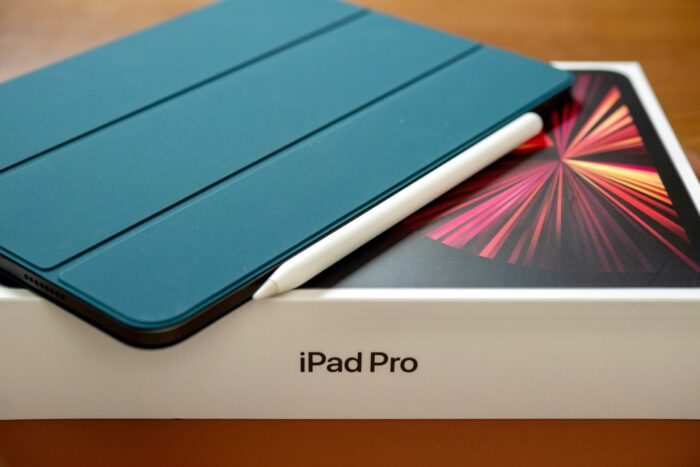
    iPad Pro M4 vs Samsung Galaxy Tab S10 Ultra

    RichardBy RichardJune 2, 2025No Comments5 Mins Read
    iPad Pro M4 vs Samsung Galaxy Tab S10 Ultra

    iPad Pro M4 vs Samsung Galaxy Tab S10 Ultra
    Choosing between the iPad Pro M4 and the Samsung Galaxy Tab S10 Ultra may be a no-brainer for some people. That’s especially true if you’re a sworn team Apple or team Android.
    But if you’re a hardcore tablet user, you know that getting the better of the two can make all the difference. Has Samsung finally found the secret sauce to beat Apple’s latest flagship iPad? In this top-down buyer’s guide, we put the new Samsung Galaxy flagship tablet side by side with the iPad Pro M4.

    Specs

    The numbers tell an interesting story right off the bat. The iPad Pro M4 comes with Apple’s newest M4 processor, the same chip that powers some MacBook Pros. You get 8GB of RAM on the base models and 16GB if you spring for higher storage, from 128GB all the way up to 2TB.
    Samsung goes down a different path with the S10 Ultra. The MediaTek Dimensity 9300+ chip handles the heavy lifting, backed by either 12GB or 16GB of RAM. Storage is pretty much the same, starting at 128GB and topping out at 1TB.
    The iPad Pro M4 sports a 13-inch Tandem OLED display with 2,752 × 2,064 pixels. Samsung goes bigger with a 14.6-inch Super AMOLED pushing 2,960 × 1,848 pixels. Both tablets support 120Hz refresh rates.
    Camera setups are fairly similar. The iPad Pro M4 has a 12MP main camera with a 10MP ultrawide lens on the back, plus a 12MP TrueDepth camera up front. Samsung matches with a 13MP main paired with an 8MP ultrawide and throws in a regular 12MP front camera and an ultrawide selfie cam.
    Both tablets rock USB-C ports with Thunderbolt 4 support.

    Pricing

    The Samsung Galaxy Tab S10 Ultra starts at $1,199, which sounds like a lot until you see the iPad Pro M4’s $1,299 starting price for the 13-inch model. Apple does offer an 11-inch version for $999.
    Samsung throws in a stylus for free, while Apple charges extra for the Apple Pencil. That’s easily another $100+. The iPad Pro M4 has one up, though. You can get it with 5G in the US, something Samsung doesn’t offer with the Tab S10 Ultra. 

    Design and display

    Both tablets feel premium, with thin profiles and solid build quality. The iPad Pro M4 measures 11.09 × 8.48 × 0.2 inches and weighs 1.28 pounds. Samsung’s tablet is bigger at 12.85 × 8.21 × 0.21 inches and heavier at 1.58 pounds, which makes sense given the larger screen.
    Neither tablet is what you’d call comfortable to hold for long periods. After 15 minutes of holding either one, your arms will start begging for a break. 
    As for the display, the Ultra wins on pure size with that 14.6-inch screen, but the iPad Pro fights back with superior brightness. Lab tests show the iPad Pro M4 hitting 938 nits in standard mode and 1,516 nits with HDR content. Samsung’s screen maxes out at 564 nits normally and 775 nits with HDR.
    What does this mean in real life? The iPad Pro M4 will be much easier to see outdoors or in bright rooms. Samsung’s screen looks great indoors but struggles when the sun hits it.
    Samsung’s color accuracy gets closer to perfect scores on the demanding DCI-P3 color space. Apple wins on the more common sRGB standard that most content uses.

    Performance

    The Samsung Galaxy Tab S10 Ultra sits pretty with 12GB of onboard RAM and the MediaTek Dimensity 9300+ chip revving under the hood.
    With Android 14, One UI 7, and Galaxy AI, you can customize across the board and do pretty much anything with AI on your side. For example, you can make voice payments at restaurants, online marketplaces, and even online casinos that accept Google Pay.
    You can easily and smoothly multitask between apps. The Galaxy S10 Ultra makes light work of video games like GTA. The same goes for streaming your favorite shows and movies.
    The iPad Pro M4 matches every bit of that and then some. It destroys Samsung’s processor in benchmark tests. We’re talking about nearly double the performance in multi-core tests and much better graphics scores.
    Neither tablet will replace your phone’s camera, but both do a decent job for video calls and the occasional photo. The iPad Pro M4’s 12MP rear camera takes good shots with nice detail and colors. The 10MP ultrawide lens is handier for capturing scene rather than group photos.
    Ultra’s 13MP main camera is a slight winner in pure megapixel count, but the photo quality is similar between the two tablets. The 8MP ultrawide lens on the Samsung tablet is a bit weaker than the iPad Pro’s.
    Front-facing cameras are where Samsung gets creative. The Tab S10 Ultra has a regular 12MP selfie cam and an ultrawide option for fitting more people into video calls. Apple sticks with a single 12MP TrueDepth camera, but it works well for Face ID unlocking and video calls.
    Both tablets can record 4K video and handle video calls without breaking a sweat. 

    Battery life

    This is where Apple pulls ahead by a wide margin. With a 31.29-watt-hour battery, the iPad Pro M4 lasted over 13 hours in tests, while Samsung’s tablet managed just over 9 hours under the same conditions.

    Wrapping up: Which tablet should you buy? 

    Both tablets cost over $1,000 and pack premium features that most people only dream about. 
    Pick the iPad Pro M4 for the best performance, longest battery life, and brightest screen. It’s better for creative work, gaming, and general productivity. 
    Go with the Samsung Galaxy Tab S10 Ultra if you want the biggest screen possible and prefer Android. The included stylus makes it great for taking notes or digital art. It’s also slightly cheaper and often available with better trade-in deals.

    Richard
    • Website
    • Facebook
    • X (Twitter)

    Richard is an experienced tech journalist and blogger who is passionate about new and emerging technologies. He provides insightful and engaging content for Connection Cafe and is committed to staying up-to-date on the latest trends and developments.

    Related Posts
    Provably Fair, Explained: What The Cryptography Actually Proves

    Provably Fair, Explained: What The Cryptography Actually Proves?

    October 8, 2026

    Residential IPs Explained for Developers

    October 6, 2026
    The Second-Screen Experience How Fans Follow Games While They Happen

    The Second-Screen Experience: How Fans Follow Games While They Happen

    October 5, 2026
    How Digital Communities Are Changing Social Entertainment

    How Digital Communities Are Changing Social Entertainment?

    September 21, 2026
    How Social Media Turned Basketball Into a Year-Round Conversation The Finals end in June, the confetti gets swept up, and for a long time that was the signal to move on. Basketball went quiet until October. Open your phone in July now and you’ll find the opposite. Someone is ranking the draft class. Someone else is arguing about a free-agent signing. A rookie’s first pro dunk is being replayed from four angles. The sport doesn’t have an off switch anymore. Social media is the reason, and it has changed how fans connect with each other as much as how they follow the game. The season used to have an off switch Before social platforms, summer was thin. You got a few newspaper pieces about trades, a draft night broadcast, and maybe a pickup game with your friends. Then you waited. Conversation lived where you lived. It happened at the barbershop, at school, at the office. If your friends moved on to baseball or didn’t care that month, the debate simply paused. That pause is gone. Whatever you want to argue about, there’s a thread, a group chat or a comment section already going, at any hour, in any time zone. Now the offseason has its own calendar The strange part is how structured the “quiet” months have become. Each stretch has its own storyline, and fans plan around them: Draft night. Fans react to every pick in real time, including players they only know from college highlights. Free agency. A few days of rumors, reactions and “who’s next” guessing that rivals the playoffs for attention. Summer League. Exhibition basketball that still draws crowds, because it’s the first look at new players. Schedule release and video game ratings. Late-summer rituals where fans check their team’s opening week and fight about player ratings. Media day and training camp. The last stretch before the season, full of workout clips and “best shape of his life” claims. There’s hardly a week where nothing is happening. The calendar fills itself in because fans keep showing up for it. Summer League is the proof Summer League is a good test case. The games are exhibitions. Most stars aren’t playing. Under older rules of fandom, almost nobody would care. Yet the numbers keep climbing. The NBA reported that the 2023 Summer League opening weekend, driven by Victor Wembanyama’s debut, delivered 300 million video views across NBA social and the NBA App. Wembanyama’s debut alone accounted for 72 million of them. The 2026 event went further. Newsweek reported that Las Vegas set new records for in-person attendance (156,000, a 12% jump over the 2018 record) and merchandise sales, and that the championship game averaged 676,000 viewers on ESPN, up 61% from the year before. Part of that is the talent. The top of the 2026 draft class was widely seen as unusually strong, and fans wanted to see it. But social media is what made the interest visible before anyone bought a ticket. Clips of rookies spread first, and the audience followed the clips. What keeps people talking when nothing is happening If there are no games, what are millions of people discussing? A few reliable things: Rumors and speculation. Every trade idea is a conversation starter, even the ones that never happen. Rankings and debates. Top-100 lists, all-time teams and “most underrated” arguments don’t need a game to be played. They only need an opinion. Player-made content. Workout videos, podcasts and behind-the-scenes clips let players talk to fans directly, without waiting for a postgame interview. Nostalgia. Old games and classic highlights resurface constantly. A 20-year-old clip can feel brand new to a fan who wasn’t watching then. Trivia and lists. Evergreen questions fill the gaps. Basketball Loop’s piece on the shortest NBA players ever, led by Muggsy Bogues at 5’3″, is the type of thing people share in the middle of July because it needs no context and starts an argument right away. Notice what these have in common. None of them depend on a live result. They depend on a community that wants to keep talking. Who actually benefits Fans get something real out of this. A group that argues together all year becomes a kind of club. People who live far from any arena, or whose friends don’t follow the sport, can find others who care just as much. Players benefit because they build audiences that don’t depend on a broadcast. Teams benefit because a fan who stayed engaged through July is more likely to buy a ticket or a jersey in October. And smaller publishers get a steady stream of topics. The offseason used to be a content desert. Now it’s one of the best times to publish, because there’s an appetite and less competition from live games. The downsides nobody likes to mention A year-round conversation has costs, and fans feel them even if they don’t say so: Burnout. Following the sport for twelve months is tiring. Some fans arrive at the playoffs already worn out. Rumor fatigue. Most speculation never turns into anything, but it all demands your attention while it’s live. Louder arguments. Hot takes travel faster than careful ones, so the loudest voices set the tone. Less quiet. There used to be a natural time to step away and come back refreshed. That window has shrunk. How to stay connected without burning out You don’t have to follow everything to enjoy the conversation. A few habits help: Choose your moments. Pick two or three offseason events you actually care about, such as the draft and Summer League, and let the rest pass. Find a small group. A group chat with five friends beats a comment section with five thousand strangers. Wait on rumors. If a trade matters, it will still matter after it’s confirmed. Take a real break. A week or two offline in the summer is a good idea, not a failure. Follow people who add something. Accounts that teach you a thing or make you laugh are worth keeping. The ones that only make you angry are not. If you run a community or a content channel The offseason is a chance to build trust, since you aren’t competing with the games themselves. These steps tend to work: Plan around the calendar. Draft, free agency, Summer League and the schedule release all give you a built-in hook. Publish evergreen pieces. Lists and explainers keep earning attention months later, while news posts fade in a day. Ask a question people can answer. Comment sections grow when the first sentence invites an opinion. Reply to people. A community forms when members see that someone is listening. Know when to stay quiet. Not every rumor needs a post. Waiting for confirmation protects your credibility. The conversation is the product For a long time, basketball was something you watched. Now it’s also something you talk about, with people you may never meet, whether or not a game is on. That’s a big change in what it means to be a fan. The game still matters most. But a lot of the connection that fans feel happens in the weeks between games, in threads and chats and quick replies at 11 p.m. in July. Social media didn’t invent that love of arguing about basketball. It just gave it somewhere to live all year. Give me a realistic image and do not use too much wording as text in the image, add title on the image

    How Social Media Turned Basketball Into a Year-Round Conversation?

    September 21, 2026
    Facebook X (Twitter) Instagram Pinterest Threads
    • Home
    • About Us
    • Privacy Policy
    • Write For Us
    • Contact Us
    • Sitemap
    © 2026 ConnectionCafe.com

    Type above and press Enter to search. Press Esc to cancel.