

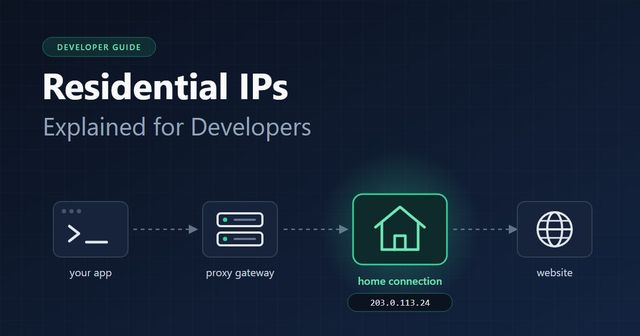
Most developers meet residential IPs the same way. A script that pulled data happily from a laptop gets deployed to a cloud VM, and the next morning the logs are full of 403s and challenge pages. Nothing in the code changed. The headers are identical. The only thing that moved is the address the requests come from.
That experience is a good starting point, because it shows what an IP address really is to the server on the other end: not just a return address, but a clue about who is knocking.
This article covers how that clue is read, what makes an address “residential”, and what you need to know before you start routing traffic through one.
Who owns the address decides what it is?
There is no flag inside a packet that says “home user”. The label comes from ownership records. Regional internet registries hand out blocks of addresses to network operators, and each operator announces its blocks under an autonomous system number, or ASN.
A cable company gets blocks and assigns them to customer routers. A cloud provider gets blocks and assigns them to virtual machines.
Those records are public, so anyone can look up who is behind an address. Try it from a terminal:
curl https://ipinfo.io/8.8.8.8/org
# AS15169 Google LLC
Run the same lookup against your home connection and you will see your internet provider’s name instead. Commercial IP intelligence databases go one step further and tag every range by type: hosting, consumer broadband, mobile carrier, business line, education and so on.
When people say an IP is residential, they mean it sits in a range that a consumer internet provider assigns to households.
Three things about home IPs that surprise people
- They move around. Many providers hand out dynamic addresses. Your router can hold the same one for months, or get a new one after a reboot. Either way, a home IP is not a stable identifier for a person.
- They are often shared. IPv4 space ran short years ago, so plenty of providers put many subscribers behind a single public address using carrier-grade NAT. From a server’s point of view, one address may be a whole apartment block. This is a big reason sites are careful about hard-banning consumer ranges: block one address and you may lock out dozens of paying customers.
- Their location is an estimate. Geolocation databases map ranges to cities based on what is known about the provider’s network. The result is usually good at country level and reasonable at city level, but it is not GPS. If your logic depends on an exact city, test it rather than trusting the label.
Why servers care?
Checking the type of an incoming address is fast and costs almost nothing, so it tends to be the first filter in any anti-abuse stack. Very few real shoppers browse from a rack in a data center.
A request from a hosting range therefore starts with a low trust score and gets rate limited, challenged or refused sooner. A request from a household range starts where an ordinary visitor starts.
That is all a residential IP buys you: a normal starting position. It is one signal among several. TLS fingerprints, header order, cookie behaviour and request timing are all read too, and a client that fires 50 requests a second with a default library user agent will look like a bot from any address on earth.
From residential IP to residential proxy
A residential proxy is simply a way to send your request out through one of those household connections. You never talk to someone’s router directly.
The provider runs a gateway, sometimes called a backconnect server, and you point your HTTP client at it. The gateway picks an exit that matches your settings, forwards the request and passes the response back.
If you want the longer walkthrough, ProxyEmpire has a plain-language guide to what residential proxies are, where the addresses come from and how the networks behind them are put together. For this article, the part that matters is how little changes in your code:
import requests
proxy = "http://USERNAME:[email protected]:5000"

r = requests.get(

    "https://ipinfo.io/json",

    proxies={"http": proxy, "https": proxy},

    timeout=30,

)

print(r.json()["org"], r.json()["city"])
If the setup works, the organisation printed is a consumer internet provider rather than your cloud host. Targeting options such as country or city are usually passed as extra parameters in the username, though the exact syntax differs from one provider to the next, so check their docs.
One detail worth knowing: for HTTPS targets your client sends a CONNECT request and then negotiates TLS with the destination through the tunnel. The proxy sees the hostname and how many bytes went through. It does not see the page contents.
Rotating or sticky: pick per task
Residential pools generally offer two modes, and choosing wrong causes most of the “it works, then it breaks” bug reports.
- Rotating gives each request a different exit address. Use it when requests are independent, like fetching 10,000 product pages.
- Sticky sessions hold one exit for a run of requests. Use it when the site expects the same visitor throughout: logging in, paginating, walking through a checkout flow.
Some providers also sell static residential addresses that stay reserved for one customer, which is a separate product with its own trade-offs. For most data collection work, the two modes above cover it.
A simple rule: if your code carries cookies from one request to the next, the IP should carry over too. A session cookie that suddenly appears from a different city is an easy flag for any fraud system.
What bites in production?
The exit node is a real home connection, and it behaves like one.
- Latency is uneven. One request returns in 400 ms, the next takes four seconds. Set generous timeouts and do not benchmark against data center numbers.
- Sessions end without warning. The device behind a sticky session can go offline at any time. Write your jobs so they can resume with a new address instead of failing the whole batch.
- You pay by the gigabyte. Residential traffic is normally metered by volume. In a headless browser, block images, fonts and video you do not need. Ask for compressed responses. It adds up quickly.
- Know which side refused you. A 407 comes from the proxy and means your credentials or parameters are wrong. A 403 or 429 comes from the target. Log them separately or you will spend an afternoon debugging the wrong system.
- Retry with some manners. Back off, switch address, try again. Hammering the same URL through fresh IPs just burns bandwidth and makes the target tighten up.
Ask where the addresses come from
Every address in a residential pool belongs to a real subscriber, so sourcing is not a side issue. Reputable networks get their capacity from people who knowingly opted in, usually in return for something, and who can leave.
Networks built on hidden software or infected devices put your project and your company at legal risk. Ask a provider directly how consent works before you sign up.
The same logic rules out free proxy lists. An address offered for nothing is typically either not residential at all or someone’s compromised machine, and whoever runs it can watch what passes through.
Finally, the address does not change what you are allowed to do. Collect public data, respect the pace a site can handle, and stay within the law and the terms that apply to you.
The short version
A residential IP is an address from a range that a consumer internet provider assigns to homes, and servers can tell because ownership records are public. Sites give those addresses the same benefit of the doubt they give regular visitors.
A residential proxy lets your requests leave through such an address via a gateway, with a one-line change in your client.
Choose rotating for independent requests and sticky for anything stateful, plan for slow and dropped connections, watch your bandwidth, and only work with networks that can explain where their addresses come from.
